Single- vs Dual- vs Quad-Channel Memory Explained
Memory channel configuration multiplies bandwidth between RAM and the CPU. How single-, dual-, and quad-channel setups differ, and why slot order matters.
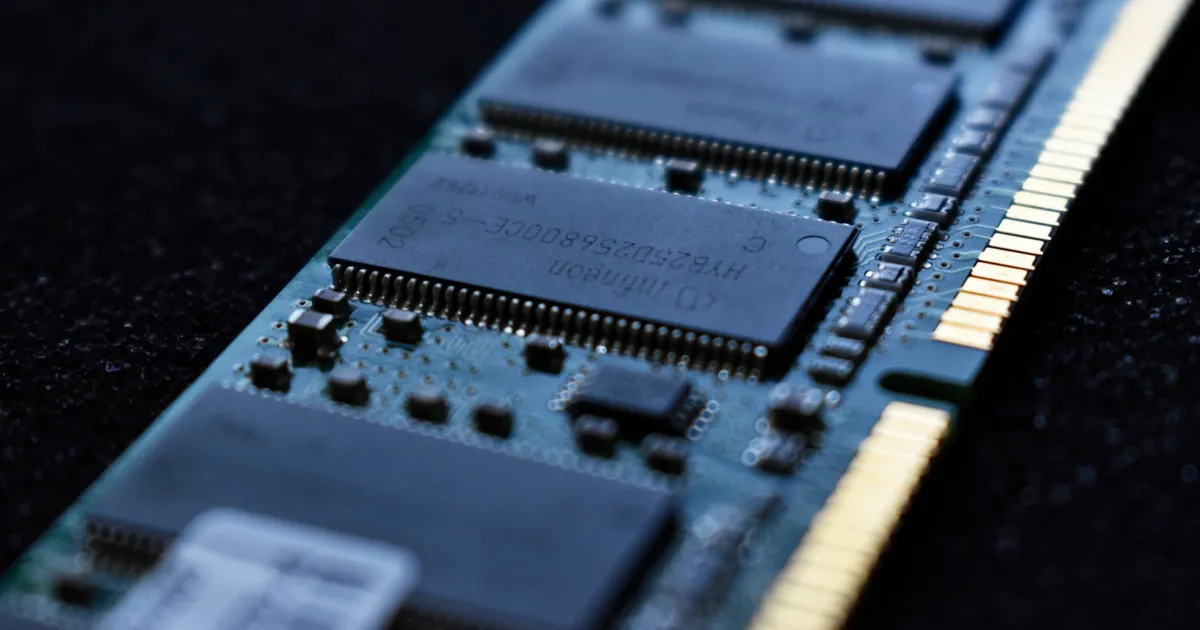
Memory channel configuration describes how many independent paths a CPU’s memory controller has to talk to RAM at once. A single-channel setup has one path; dual-channel has two; quad-channel (and higher) has four or more. Each additional channel the controller can use in parallel roughly multiplies available memory bandwidth, which is why board layouts, DIMM slot colors, and BIOS documentation all make a point of telling you how to populate memory correctly.
How a memory channel works
A memory channel is a physical bus between the memory controller (built into the CPU on modern systems) and one or more DIMM slots. Each channel can be read from or written to independently of the others. When the controller interleaves accesses across multiple channels — splitting a single memory request’s data across them — total throughput scales roughly with the number of channels available, because the channels transfer their portions simultaneously instead of one after another.
This is distinct from a DIMM’s own clock speed. A dual-channel kit of DDR5-6000 isn’t twice as fast as a single-channel DDR5-6000 stick in raw per-pin speed — the pins run at the same rate — but the aggregate bandwidth available to the CPU roughly doubles, since two channels are moving data at once. Speed grade and channel count are separate levers that both affect real-world throughput; see DDR vs GDDR memory for how the underlying signaling itself differs by memory type.
Single-channel: the baseline
A single DIMM installed in a system that supports multiple channels runs in single-channel mode — all memory traffic funnels through one bus. This is the default state of a system shipped with only one memory stick, and it’s a common, easy-to-miss performance ceiling on prebuilt machines and laptops sold with a single RAM module: the CPU may be perfectly capable of dual-channel operation, but nothing is populating the second channel.
Dual-channel: the common case
Installing two matched DIMMs — same capacity, same speed, ideally the same kit — into the correct slot pairing enables dual-channel mode, roughly doubling available bandwidth over a single-channel setup. Motherboards typically color-code DIMM slots in pairs (e.g., slots 1 and 3 one color, slots 2 and 4 another) specifically so users populate a matched pair on the same channel pairing rather than two adjacent, mismatched-channel slots. Consumer desktop and laptop platforms are built around dual-channel as the mainstream target; it’s the configuration most retail memory kits (sold as matched two-stick sets) are designed for.
Quad-channel and beyond
High-end desktop and server platforms expose four, six, eight, or more memory channels, aimed at workloads that are genuinely bandwidth-hungry — large in-memory datasets, multi-threaded scientific computing, or servers running many memory-intensive processes concurrently. Populating all channels with matched DIMMs is required to realize the benefit; an unbalanced configuration (three DIMMs on a four-channel platform, for instance) either falls back to a lower effective channel count or runs in an asymmetric mode that doesn’t deliver full bandwidth. Server platforms frequently pair high channel counts with ECC memory for error correction, since the workloads justifying that much bandwidth are usually also the ones where a silent memory error is expensive to have gone undetected.
Bandwidth scaling by configuration
| Configuration | Channels | Typical bandwidth multiplier | Common on |
|---|---|---|---|
| Single-channel | 1 | 1x (baseline) | Budget laptops, misconfigured desktops |
| Dual-channel | 2 | ~2x | Mainstream desktops and laptops |
| Quad-channel | 4 | ~4x | High-end desktop / workstation platforms |
| Octa-channel | 8 | ~8x | Server / data center platforms |
These multipliers are theoretical ceilings based on channel count alone — real-world gains depend on whether the workload is actually bandwidth-bound in the first place, and on other factors like memory latency and how the CPU’s own cache hierarchy absorbs repeated accesses before they ever reach main memory.
Why population order matters
Motherboard manuals specify a required slot order for enabling multi-channel mode, and it’s not arbitrary — it reflects how the traces from each channel are physically routed to specific slots on the board. Installing two DIMMs in the wrong pair of slots on a four-slot dual-channel board will often leave the system running in single-channel mode without any error, since the system still boots and works — it just doesn’t use the second channel. Mismatched DIMMs (different capacity, speed, or timings) across a channel pair typically still work, but the platform usually clocks both down to the slower module’s specification, and the CPU’s memory controller may fail to negotiate its highest-frequency setting at all across an unmatched pair, so consistent bandwidth loss compounds with the population-order mistake.
Does channel count actually matter day to day
For typical desktop use — web browsing, office applications, most games — the difference between single- and dual-channel is often noticeable because dual-channel is the platform’s designed baseline, and many workloads (especially integrated graphics, which borrow system memory for frame buffers) are meaningfully bandwidth-sensitive. Beyond dual-channel, the marginal benefit of quad-channel or higher depends heavily on the workload: NUMA-aware server applications and large in-memory databases benefit substantially, while a typical desktop workload rarely saturates even dual-channel bandwidth. Bandwidth is also only one half of the memory performance story — see memory bandwidth vs latency for how the two interact, and why a system bottlenecked on latency won’t necessarily speed up from more channels alone. Much of that latency-hiding work happens before a request ever reaches a memory channel, inside the CPU’s own L1/L2/L3 cache hierarchy.
The takeaway
More memory channels roughly multiply the bandwidth available between RAM and the CPU, but only if DIMMs are populated correctly — matched capacity and speed, in the slot pairing the motherboard specifies for multi-channel operation. Dual-channel is the mainstream default worth confirming on any new build or prebuilt system; quad-channel and above matter mainly for genuinely bandwidth-bound workstation and server workloads, where the extra channels are paired with platforms designed to actually use them.
Keep reading
 Chisato · · 4 min read
 Thermal Interface Materials Explained
Thermal interface material fills microscopic gaps between a chip and its heatsink so heat can actually transfer to the cooler.
Chisato · · 4 min read Clock Speed vs. IPC: What Actually Makes a CPU Fast
Clock speed measures cycles per second; IPC measures work done per cycle. Real CPU performance is the product of both, not either one alone.
 Chisato · · 4 min read
 UMA vs NUMA: Memory Architecture Explained
UMA gives every CPU core equal-latency memory access; NUMA gives each core faster access to its local memory bank. How the two architectures differ.